Collect down payment in brick and mortar store (v4)
Enable your cashiers to verify and collect aCuotaz financing down payments at your physical point of sale.
⚠️ CRITICAL: Only generate an invoice and deliver the product after receiving a 200 OK response from the Receive down payment and billing endpoint. Only those transactions are billable to aCuotaz. The store is responsible for any products delivered without this confirmation.
Version 4 requirement: This version requires
financed_productson every verify call. Products must match any previously stored list for the same financing.
Quick reference
What the cashier must collect
Amount to collect = downpayment_amount_inhouse + excedent_amountThis is the only number your cashier needs to collect before delivery.
Pre-qualifier option
Customers can optionally use a pre-qualifier link beforehand to get pre-qualified. It is a custom link we provide your store; you can request it from us.
Authentication
All requests require a bearer token:
Authorization: Bearer <your_client_token>Base URL
https://apurata.com/pos/client/inhouse-downpayment/Key concepts
Before integrating, understand these terms:
| Term | Definition |
|---|---|
| funding_code | A short numeric code displayed on the customer's phone after aCuotaz approval. The cashier uses this + DNI to process the transaction. |
| downpayment_amount_inhouse | The down payment amount the store must physically collect. This is the total down payment minus any amount already paid through aCuotaz platform. |
| excedent_amount | Amount aCuotaz cannot finance (billed_amount - approved_amount). The store must also collect this before delivering. |
| credit_line | Sometimes aCuotaz approves a higher amount than the initial order. Customers may use this to buy more items at the store. |
| financed_products | Required product list in v4. If products are already stored for this financing, your list must match them exactly (order doesn't matter). |
Process flow
Overview diagram
The following diagram shows the interactions between your salesman/cashier, the customer, and aCuotaz through APIs:
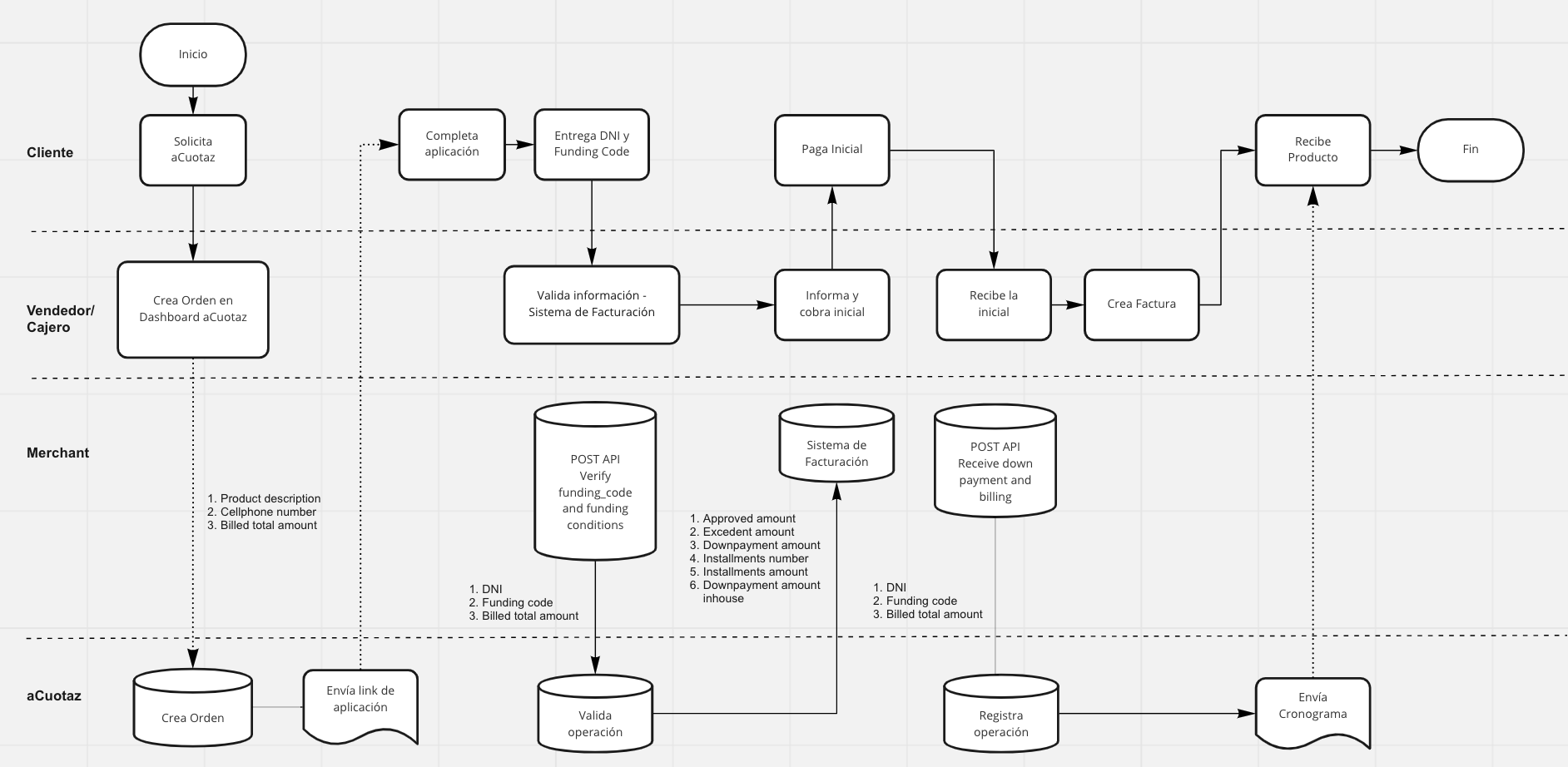
Step-by-step flow
1. Customer requests aCuotaz financing
The customer selects financing at your store. Optionally, they may have used a pre-qualifier link beforehand to get pre-qualified (a custom link we provide; you can request it from us). The salesperson creates an order on aCuotaz dashboard or your ERP system.
2. Customer completes aCuotaz application
The customer receives an SMS link, completes the application, selects whether to pay the down payment at the store or via aCuotaz, and validates their identity.
3. Customer shows their funding code
Once approved, aCuotaz displays a funding_code on the customer's phone. The customer provides this code and their DNI to the cashier.
4. Cashier calls Verify funding code endpoint
The cashier scans/registers all items the customer plans to purchase and inputs the funding_code and dni in the store invoice system. Your system validates the transaction details by calling the Verify funding_code and funding conditions endpoint to check:
- Whether the
funding_codeis valid - The total payment amount the store needs to collect
- The number and amount of installments the customer needs to pay to aCuotaz
5. Cashier collects payment
Once validated, but before generating any invoice, the cashier collects exactly:
downpayment_amount_inhouse + excedent_amount
6. System calls Receive & Bill endpoint
After collecting payment but before generating an invoice, the store invoice system calls the Receive downpayment and billing endpoint to confirm the funding_code is valid and transaction details are correct.
7. Generate invoice and deliver product
Only when the merchant receives a 200 OK response from aCuotaz, an invoice can be generated and the product delivered. Note that only orders we responded with code 200 at this stage will be billable to aCuotaz.
Error recovery
Scenario 1: "billed_amount changed" error (400)
If step 6 returns this error:
- Return to step 4: call Verify funding_code and funding conditions again
- Collect the corrected down payment amount from the customer
- Retry step 6: call Receive downpayment and billing again
Scenario 2: Need to undo a billing
If you need to change something (e.g., product color):
- Call the Undo billing endpoint
- Note: This does not cancel the credit loan—the down payment stays as paid
- It only resets the billing state so you can call Receive & Bill again
Cashier quick guide
Quick checklist for cashiers at the POS terminal:
✅ Customer provides funding_code and DNI
→ Enter code and DNI in POS system
✅ System calls Verify endpoint (automatically or manually)
→ Check amount to collect on screen: downpayment_amount_inhouse + excedent_amount
✅ Collect payment from customer (cash/card)
→ Payment must be collected before generating invoice
✅ System calls Receive & Bill endpoint (automatically or manually)
→ ⚠️ Wait for 200 OK confirmation
✅ Only after 200 OK → Generate invoice and deliver product
⚠️ CRITICAL: Never deliver without 200 OK confirmation. Only orders with 200 OK are billable to aCuotaz.
Endpoints
We use a REST JSON API.
Verify funding_code and funding conditions
Validates whether the provided dni/ruc and funding_code are valid and returns information about the down payment amount the store needs to collect and the number and amount of installments the customer needs to pay aCuotaz.
In some occasions, aCuotaz may approve a higher amount than the initial order (credit line). Customers may opt to use it by selecting extra items at your store, thus changing the final billed amount. In those cases, this API will recalculate the amount of installments and the down payment amount. Note that we won't ask the customer's confirmation for the new credit conditions. However, we will notify them via sms and email, and your cashier will also have that information available.
The merchant is responsible for checking whether the funding code is valid through this endpoint before collecting any payment.
URL:
https://apurata.com/pos/client/inhouse-downpayment/v4/verify-fundingcode-and-conditionsMethod: POST
Request parameters
| Field | Type | Required | Description |
|---|---|---|---|
dni |
string | optional* | Customer national ID. *Send either dni or ruc. |
ruc |
string | optional* | Business tax ID. *Alternative to dni. |
funding_code |
string | required | Code shown on customer's phone after approval. |
billed_amount |
float | required | Total amount being billed to the customer. |
cashier_id |
string | required | ID of the cashier processing this transaction. Cannot change between calls for the same financing. |
financed_products |
list\<object> | required | Non-empty list of product objects. Must match any products already stored for this financing (e.g., from a previous verify call). |
allow_billed_amount_change |
boolean | optional | Default false. Set to true when the billed amount differs from the order amount (see usage below). |
allow_billed_amount_change usage:
Use true when the amount the customer is actually paying at the store is different from the order amount. That can be because they bought for less (e.g. fewer items), for more (e.g. they added items and have credit line), or the total changed for another reason. We then recalculate down payment and installments.
Use false (or omit) when the billed amount is the same as the order amount; we then validate that they match.
Product object structure
All fields are required:
| Field | Type | Description |
|---|---|---|
sku |
string | Product SKU code |
name |
string | Product name |
unit_price_after_discount |
float | Unit price after discount (must be > 0) |
quantity |
integer | Quantity (must be ≥ 1) |
discount |
float | Discount amount (must be ≥ 0) |
brand |
string | Product brand |
category |
string | Product category |
warranty_months |
integer | Warranty in months (must be ≥ 0) |
product_stage |
string | Product stage: "new", "used", or "refurbished" |
Response (200 OK)
| Field | Type | Description |
|---|---|---|
dni |
string | Customer DNI (could be RUC instead) |
funding_code |
string | The validated funding code |
billed_amount |
float | The confirmed billed amount |
billed_by_ecommerce |
boolean | true if billing has already been confirmed via the bill endpoint |
approved_amount |
float | The amount aCuotaz approved for financing |
excedent_amount |
float | billed_amount - approved_amount. Amount the customer must pay that aCuotaz cannot finance. |
downpayment_amount |
float | Total down payment amount |
downpayment_amount_inhouse |
float | Amount the store must collect. = downpayment_amount minus any amount already paid to aCuotaz. |
installments_number |
integer | Number of installments (does not include down payment) |
installments_amount |
float | Amount per installment (other than down payment) |
financed_products |
list\<object> | Echo of products persisted for this financing |
Understanding the response fields:
| Field | Formula | What it means |
|---|---|---|
excedent_amount |
billed_amount - approved_amount |
Amount aCuotaz cannot finance. Store must collect this. |
downpayment_amount |
— | Total down payment the customer must pay |
downpayment_amount_inhouse |
downpayment_amount - already_paid_to_acuotaz |
Amount the store must collect for down payment |
💡 The exact amount the store must collect before delivering:
downpayment_amount_inhouse + excedent_amountIf customer overpaid (e.g., billed amount decreased), we credit the difference by reducing the next installment.
Sample request
Replace <your_token> with your actual bearer token.
curl -X POST 'https://apurata.com/pos/client/inhouse-downpayment/v4/verify-fundingcode-and-conditions' \
  -H 'Authorization: Bearer <your_token>' \
  -H 'Content-Type: application/json' \
  -d '{
    "dni": "70323554",
    "funding_code": "3806888",
    "billed_amount": 600,
    "cashier_id": "12345",
    "allow_billed_amount_change": true,
    "financed_products": [
      {
        "sku": "SKU-1",
        "name": "zapatillas",
        "unit_price_after_discount": 300.0,
        "quantity": 1,
        "discount": 0.0,
        "brand": "Nike",
        "category": "calzado",
        "warranty_months": 6,
        "product_stage": "new"
      },
      {
        "sku": "SKU-2",
        "name": "celular",
        "unit_price_after_discount": 300.0,
        "quantity": 1,
        "discount": 0.0,
        "brand": "Xiaomi",
        "category": "telefonia",
        "warranty_months": 12,
        "product_stage": "new"
      }
    ]
  }'
Error responses
| Status | Description |
|---|---|
| 401 | Wrong or missing client token |
| 404 | Funding code does not exist or is not active |
| 404 | Financing DNI does not match with the DNI sent |
| 400 | Error on DNI or funding_code format |
| 400 | cashier_id changed between calls |
| 400 | billed_amount cannot change after being marked as billed |
| 400 | financed_products is missing or empty |
| 400 | Products must match those from the order or from a previous verification |
| 400 | billed_amount must match order amount. Set allow_billed_amount_change to true to override. |
| 400 | Invalid product schema (e.g., missing required field) |
| 400 | Your store is not allowed to use this endpoint |
Receive down payment and billing
Confirms the down payment was collected and marks the transaction as billed. Only orders we successfully marked as billed with this endpoint will be billable to aCuotaz. The store is responsible for any products delivered without receiving confirmation from us through this endpoint.
This endpoint verifies two things:
- That the
billed_amountdidn't change - That the user accepted the new installment schedule (we may request it in some occasions for risk management reasons)
⚠️ Call this endpoint AFTER collecting the down payment but BEFORE generating an invoice. This way, if we have an error preventing the billing process, you don't have to undo your billing.
ℹ️ This endpoint is idempotent: Calling it multiple times has no additional effect after the first successful call.
Common error scenarios:
| Error | What to do |
|---|---|
| "billed_amount changed" | Call Verify funding_code and funding conditions again to get updated amounts |
| "Customer did not accept new installment schedule yet" | Ask customer to review and accept the new schedule on the aCuotaz website |
After successful billing:
When you call Verify funding_code and funding conditions after a successful billing, the response will show billed_by_ecommerce: true and downpayment_amount_inhouse will reflect the amount you should have collected.
URL:
https://apurata.com/pos/client/inhouse-downpayment/v4/paid-and-billedMethod: POST
Request parameters
| Field | Type | Required | Description |
|---|---|---|---|
dni |
string | optional* | Customer national ID. *Send either dni or ruc. |
ruc |
string | optional* | Business tax ID. *Alternative to dni. |
funding_code |
string | required | The customer's funding code |
billed_amount |
float | required | Must match the amount from the preceding verify call |
cashier_id |
string | required | Must match the cashier_id used in verify |
financed_products |
list\<object> | required | Must exactly match the products already stored for this financing. Order does not matter. |
Response (200 OK)
{ "status": "ok" }Sample request
curl -X POST 'https://apurata.com/pos/client/inhouse-downpayment/v4/paid-and-billed' \
  -H 'Authorization: Bearer <your_token>' \
  -H 'Content-Type: application/json' \
  -d '{
    "dni": "70323554",
    "funding_code": "3806888",
    "billed_amount": 600,
    "cashier_id": "12345",
    "financed_products": [
      {
        "sku": "SKU-1",
        "name": "zapatillas",
        "unit_price_after_discount": 300.0,
        "quantity": 1,
        "discount": 0.0,
        "brand": "Nike",
        "category": "calzado",
        "warranty_months": 6,
        "product_stage": "new"
      },
      {
        "sku": "SKU-2",
        "name": "celular",
        "unit_price_after_discount": 300.0,
        "quantity": 1,
        "discount": 0.0,
        "brand": "Xiaomi",
        "category": "telefonia",
        "warranty_months": 12,
        "product_stage": "new"
      }
    ]
  }'
Error responses
| Status | Description |
|---|---|
| 401 | Wrong or missing client token |
| 404 | Funding code does not exist or is not active |
| 400 | Error on DNI or funding_code format |
| 400 | billed_amount changed — call Verify again to get updated conditions |
| 400 | cashier_id changed |
| 400 | financed_products is missing or empty |
| 400 | Products have changed — call Verify again with the correct products |
| 400 | Invalid product schema |
| 400 | Client not enabled to use this API |
| 400 | Customer did not accept new installment schedule yet. Ask the customer to review it on the aCuotaz website. |
Undo billing
Reverses a billing confirmation so the Receive downpayment and billing endpoint can be called again. Use this when you need to reprocess a transaction (e.g., to change the product color).
⚠️ This does not cancel the credit loan. The down payment remains collected. Only the billing status is reset.
ℹ️ This endpoint uses v3 as it has not changed in v4.
URL:
https://apurata.com/pos/client/inhouse-downpayment/v3/undo-billingMethod: POST
Request parameters
| Field | Type | Required | Description |
|---|---|---|---|
dni |
string | optional* | Customer national ID. *Send either dni or ruc. |
ruc |
string | optional* | Business tax ID. Only RUCs starting with 10 are supported. |
funding_code |
string | required | The funding code to undo billing for |
Response (200 OK)
{ "status": "ok" }Sample request
curl -X POST 'https://apurata.com/pos/client/inhouse-downpayment/v3/undo-billing' \
  -H 'Authorization: Bearer <your_token>' \
  -H 'Content-Type: application/json' \
  -d '{
    "dni": "70323554",
    "funding_code": "3806888"
  }'
After undo:
The billed_amount state is cleared. You can now call Receive down payment and billing again for the same funding code. Useful when the customer wants to change the product or exchange an item.
Examples
Common transaction scenarios showing what to collect and how amounts are calculated. These examples use a 4-installment plan (1 down payment + 3 installments) for illustration.
Scenario A: Down payment fully collected at store
Case 1: Customer buys for less than approved
- Approved: S/200, Customer purchases: S/150
- Call verify with
billed_amount: 150andallow_billed_amount_change: true - Conditions are recalculated (e.g., 4 cuotas: down payment S/37.5, 3 installments of S/37.5)
- Collect at store: S/37.5
Case 2: Customer buys more, within credit line
- Initial order: S/200, Credit line: S/600, Customer purchases: S/400
- Call verify with
billed_amount: 400andallow_billed_amount_change: true - New down payment: S/100, 3 installments of S/100
- Collect at store: S/100
Case 3: Customer exceeds credit line
- Credit line: S/600, Customer purchases: S/800
- Call verify with
billed_amount: 800andallow_billed_amount_change: true - Response:
approved_amount: 600,excedent_amount: 200,downpayment_amount_inhouse: 150 - Collect at store: S/350 (S/150 aCuotaz down payment + S/200 excedent)
- Customer then has 3 installments of S/150 with aCuotaz
Scenario B: Down payment partly or fully paid to aCuotaz
When customers pay down payment through aCuotaz platform (card/transfer), the store only collects the remaining amount.
Case 4: Customer pre-paid S/50 to aCuotaz, then buys for S/150
- New down payment is S/37.5
- We credit S/12.5 to the next installment
- Response:
downpayment_amount_inhouse: 37.5 - Collect at store: S/37.5 (nothing extra for the down payment)
Case 5: Customer pre-paid S/50 to aCuotaz, then buys for S/400
- New down payment is S/100
- Response:
downpayment_amount_inhouse: 50 - Collect at store: S/50 (the difference)